
CDXStreamer™ Tools and Excel Apps
Frequently Asked Questions
The free 7-day trial of CDXStreamer includes full access to our online tools and Excel add-in for address verification, Zip+4 data and demographics. It can provide up to a total of 1000 individual address or zip code requests. The 1000 request limit is combined accross all applications, not per application.
The online Address Verification tool require that you first upload a spreadsheet or csv file containing your requested address list. Additional information on using single or multiple column formats is available in the tool. Once uploaded our servers will validate your data and present a preview and anticipated charges. Log in with your Streamer account or purchase using the Buy-Now function to complete the transaction. A download link to the csv file output will be provided after the report completes.
The online Bulk Demographics tool require that you first upload a spreadsheet or csv file containing your requested adresss lists in a single column. Additional information on ormatting is available in the tool. Once uploaded our servers will validate your data and present a preview and anticipated charges. Log in with your Streamer account or purchase using the Buy-Now function to complete the transaction. A download link to the csv file output will be provided after the report completes.
The Radius and State/County Demographic tools don't use lists but instead require you to specifiy a radius or select from lists of States and Counties.
We've created a free analysis template that supports the output of each demographic tool. Use the "Import CSV File" function to bring in your data. If duplicate zip codes are included in the report an option to combine results will be presented.
Street address correction in CDXStreamer follows the US Postal Service one component failure rule
to find a correct address match. If not more than one address component mismatch exists, where a component
is defined as a predirectional, street name, street suffix, or a postdirectional, then a correct address can be returned. For instance, the address 500 North Main Street West
has four components. If one of the components has to be added, changed, or deleted to achieve a unique match, CDXStreamer will correct the address and return the ZIP+4 Code. If more than one component is incorrect, no match is allowed. Also, no match can be returned if adding, changing or deleting a component results in multiple matches. The priority is to add a suffix first before adding a directional. If no match exists, the suffix is changed or deleted, and then the directional.
If there is not an exact match within the city, the one component failure rule
is applied within the input ZIP Code. If there is still no match, the rule is applied to all addresses within the postal finance number, and is only considered invalid if there is no match within that.
You can access CDXStreamer from the main CDXStreamer commandbar, by right-clicking on any worksheet cell, or by directly entering a CDXStreamer function in a worksheet formula.
From the Commandbar: The CDXStreamer commandbar at the top of your worksheet includes all functionality as well as access to the help file, license information, data usage, and settings. To obtain data for a list of ZIP+4 Codes, for example, use your cursor to select the first ZIP Code in the list, click on the CDXStreamer button on the commandbar, and the main CDXStreamer interface will appear:
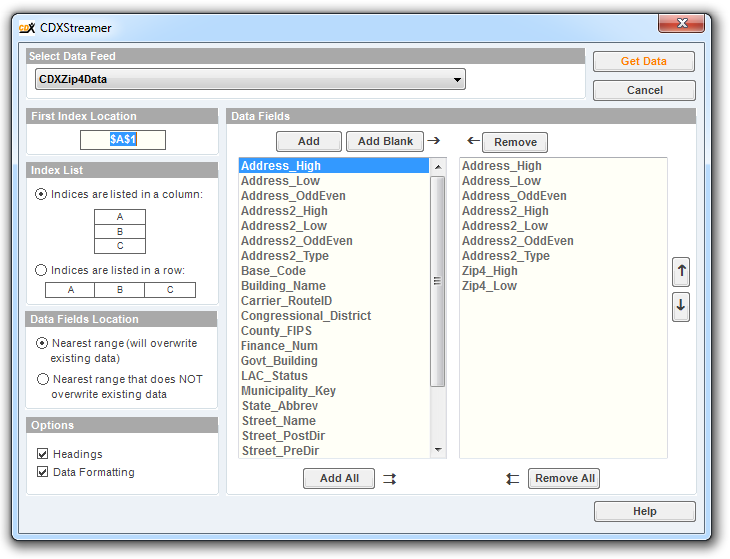
Here you can select the data feed and data fields to import. Then click Get Data
and CDXStreamer does the rest.
Right-click: Right-click your mouse on any worksheet cell, and from the drop-down list select CDXStreamer
. You can then select Insert CDXStreamer Data
or Address Verification
and proceed from there.
Enter a worksheet formula: You can also use any CDXStreamer function or data feed by directly entering it in a worksheet formula.
CDXStreamer is compatible with all Microsoft Excel 32- and 64-bit versions for Windows, beginning with Excel 2010.
The recommended system configuration is a computer running Microsoft Windows® 7 Professional or higher with a Pentium IV processor and 512 megabytes (MB) of RAM. Minimum system requirements for Office products are available here from the Microsoft website.
For the Excel add-in refer to this document CDXStreamer Data Feeds and Definitions.pdf for a complete listing of all available data. An example of an demographic output data file with all covered items can be downloaded here.
The online tools only support U.S. addresses. The Excel Add-in supports US ZIP+4, US TIGER/ZIP+4 and Canadian Postal data. Please note that address verification applies only to U.S. addresses.
Canadian postal code data covers all Canadian provinces.
You can purchase a block of data requests which are available for a period of one year. Fixed one-time block purchases have a one-time charge and do not automatically renew.
CDXZipStream has a much wider variety of location-based functionality, but both CDXZipStream and CDXStreamer perform address ZIP Code lookup and address verification. If these are your primary interests, which software do you choose?
CDXZipStream is a one-time, single license purchase that includes one year of data updates. CDXStreamer is a monthly, subscription-based service. CDXZipStream can use either Bing Maps or Microsoft MapPoint as the source of address data and postal code data, and covers the U.S. and other countries. CDXStreamer uses U.S. Postal service databases, and covers only the U.S. CDXStreamer also provides ZIP+4 data which is not included in CDXZipStream. We generally recommend using CDXStreamer when high address accuracy and/or ZIP+4 data in the U.S. is required.
ZIP+4, TIGER/ZIP+4, and data associated with address verification are provided by the U.S. Postal Service. Canadian postal code data is provided by a licensee of Canada Post.
To verify a list of addresses, use your cursor to select an empty cell next to the list, and then click on the Address Verification button on the CDXStreamer commandbar. The address verification interface will appear:
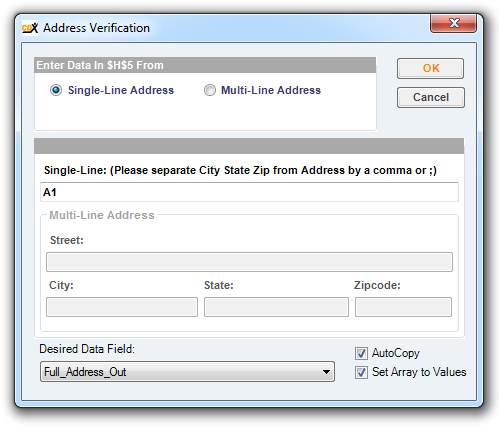
After specifying the location of the first address in this list (for this case, in cell A1) and the desired data field (Full_Address_Out), we also suggest enabling Autocopy
and Set Array to values
for long data lists. These options will automatically return data for the entire list (until the first occurrence of an empty row), and return values instead of formulas. Then click OK
and CDXStreamer will return to your worksheet the corrected, standardized addresses for the entire list.
We offer a free Excel template that completely automates address verification and parsing. Please see the CDXStreamer template page for more information.
Address verification can also be performed when street, city, state and ZIP Code data are in separate columns. In this case just specify the Multi-Line Address
format, and fill in the cell locations for each component of the first address.
For an address list that has missing or possibly incorrect ZIP or ZIP+4 Codes, use your cursor to select an empty cell next to the list, then click on the Address Verification
button on the commandbar. The address verification interface will appear:
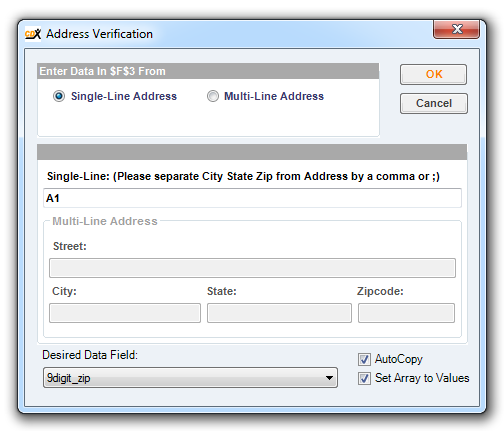
For this case we specify the location of the first address in cell A1, and the desired data field 9digit_zip
for a ZIP+4 Code. (We could specify just the 5-digit ZIP as well.) We also suggest enabling Autocopy
and Set Array to values
for long data lists. These options will automatically return data for the entire list (until the first occurrence of an empty row), and return values instead of formulas. Then click OK
and CDXStreamer will return to your worksheet correct ZIP+4 Codes for the entire list.
You can also get ZIP and ZIP+4 Codes when street, city, state and ZIP Code data are in separate columns. In this case just specify the Multi-Line Address
format, and fill in the cell locations for each component of the first address.
To obtain data for a list of ZIP+4 Codes, use your cursor to select the first ZIP Code in the list, click on the CDXStreamer button on the commandbar, and the main CDXStreamer interface will appear:
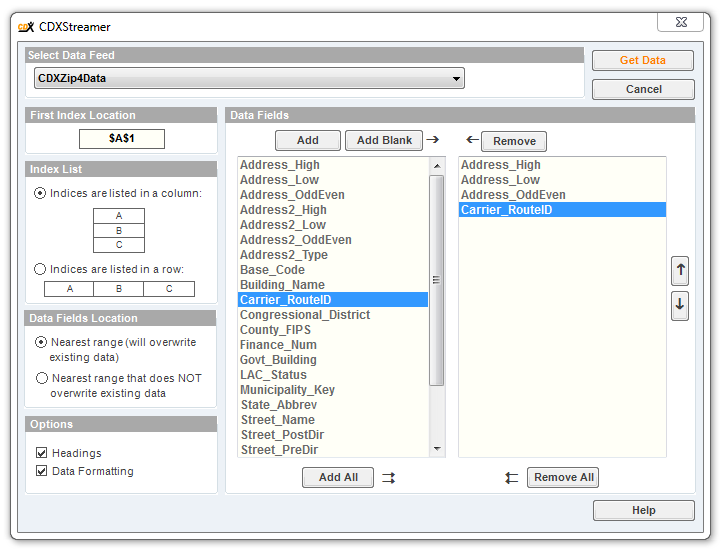
Here select the CDXZIP4 Data feed and one or more desired data fields, such as Carrier_RouteID
. Then click Get Data
and CDXStreamer will return the selected data fields for every ZIP+4 Code in the list, until the first occurrence of an empty row.
To parse an address list into its different components, use your cursor to select an empty cell next to the list, and then click on the Address Verification
button on the CDXStreamer commandbar. The address verification interface will appear:
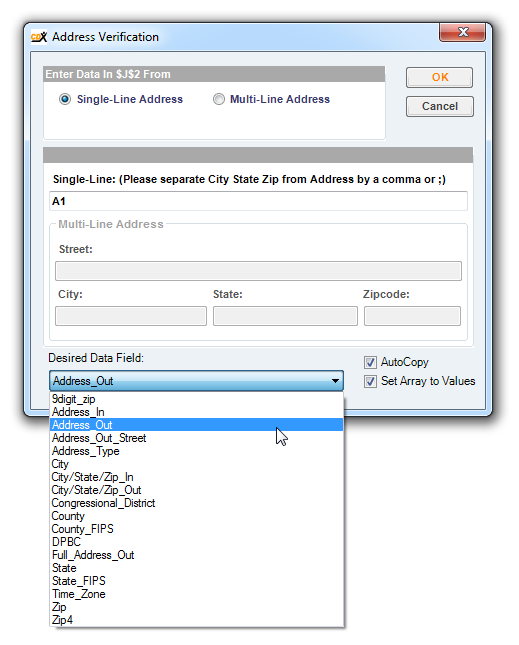
For this case we specify the location of the first address in cell A1, and the desired data field Address_Out
for the street address. We also suggest enabling Autocopy
and Set Array to values
for long data lists. These options will automatically return data for the entire list (until the first occurrence of an empty row), and return values instead of formulas. Then click OK
and CDXStreamer will return to your worksheet the street addresses for the entire list. Then just repeat the process for the other components (city, state, ZIP or ZIP+4 Code).
We offer a free Excel template that completely automates address verification and parsing. Please see the CDXStreamer template page for more information.