

Geocode (latitude and longitude) data is fast becoming the standard by which businesses are finding and identifying their current and prospective customers. Although traditional address information will probably always be used in some capacity, the advantages of using geocode data are many, including better accuracy, the ability to calculate distances between points of latitude and longitude, and compatibility with GPS (Global Positioning Systems), now a common feature provided with the iPhone, iPad and many other mobile devices.
A common example where geocode information is used is web-based store locator widgets. Input your home address or zip code, and a list of stores is returned, with the closest one usually listed first. The distance to each store is calculated based on the latitude and longitude of your home and each store location. Although this is a simple application of geocode data, it illustrates the power of accurate distance calculations that can also be used in more sophisticated ways. For instance, location-based advertising for mobile devices (a booming market for Google and Apple) can tailor the advertising message using latitude and longitude coordinates provided by the device GPS, and then conveniently point consumers to the nearest store of interest.
Our Microsoft Excel add-in CDXZipStream contains a geocoder capability that can be applied to large amounts of data, to provide geocode coordinates for any address, reverse geocode to find the closest address, and calculate the distance between two geocode locations.
The video below shows how it works:
Geocoder in ExcelLet's take a look at how using a geocoder can support a specific business need.
Example: Using a Geocoder to Increase Market Share
A national retailer with many franchise locations would like to determine which ones are best geographically located to take market share from a competitor. A targeted marketing campaign (with special coupon offers, direct mail marketing, and radio advertisements) will focus on those locations that are within a 10 mile radius of a competitor store.
A master list of all franchise addresses as well as competitor stores can easily be geocoded in Excel using CDXZipStream. A sample of the geocoded data is shown here:
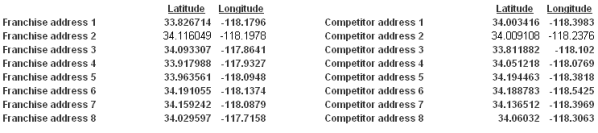
A matrix is then developed where CDXZipStream calculates the distance between all franchise and competitor stores using the latitude and longitude data:
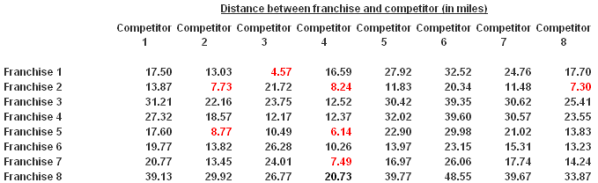
The cases that meet the 10 mile radius criteria are highlighted in red. In the sample data shown here, four out of eight franchises are within a 10 mile radius of a competitor store, and in two cases (Franchises 2 and 5) they are within a 10 mile radius of two or more stores. Data presented in this way can easily help prioritize marketing resources to get the most "bang for the buck" out of a targeted marketing campaign.