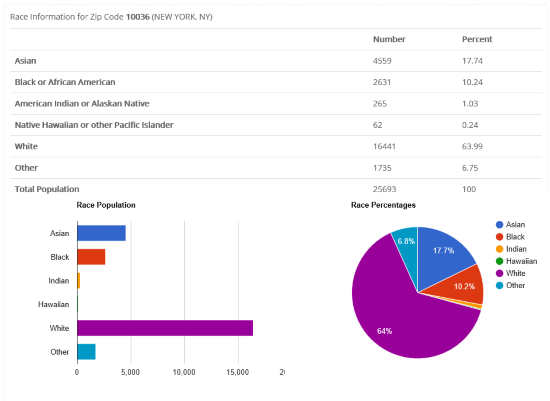
Welcome to the free demographic data site from CDX Technologies. Get population, race, gender, hispanic and location data based on zip code. The report now includes the latest data from the Decennial 2020 U.S. Census and the 2023 American Community Survey (ACS). Just select a report, enter your zip code and press the Generate Report
button.
The reports contain over 50 key demographic statistics including household income, population, median age and business employment. Most of the data is derived from the 2010 US Census and the latest data from the U.S. Census American Community Survey (ACS). Click on the Data Definitions
dropdown for an explanation of any item.
To purchase a demographic report for all U.S. zip codes for $99 click here.
If you need to download data for many specific zip codes at one time use our Zip Code Demographics Batch Report Tool. To generate demographics for a list of zip codes based on your location use our Zip Code Demographics by Radius or Zip Code Demographics by State/County tools.
You can analyze lists created with these tools by downloading our free Demographic Report Template. To create advanced demographic reports with the latest data from the US Census, we recommend using our CDXZipStream software. CDXZipStream has many more demographic items from the American Community Survey. To review the demographics covered, click here
This application is also available in the Microsoft Windows Store and can be found here.
Data Usage
The information available on this site is the property of CDX Technologies, a division of Hughes Financial Services Inc. (HFS). HFS may license certain data feeds from others and this information remains the property of the copyright holders.
HFS grants the users of this site the right to access this data for personal, noncommercial purposes. No part of this site may be used for commercial purposes, except as permitted in writing by HFS.
Disclaimer
We have obtained this information from sources believed by us to be reliable. All information and reports provided to you AS IS
without warranty of any kind. Your use of the site indicates acceptance of these terms and we and our licensors will not be responsible for damages of any type.
Example Report